Where you can use Joomla
Many companies and organizations have requirements that go beyond what is available in the basic Joomla package. In those cases, Joomla’s powerful application framework makes it easy for developers to create sophisticated add-ons that extend the power of Joomla into virtually unlimited directions.
The core Joomla framework enables developers to quickly and easily build:
- Inventory control systems
- Data reporting tools
- Application bridges
- Custom product catalogs
- Integrated e-commerce systems
- Complex business directories
- Reservation systems
- Communication tools
Since Joomla is based on PHP and MySQL, you’re building powerful applications on an open platform anyone can use, share, and support.
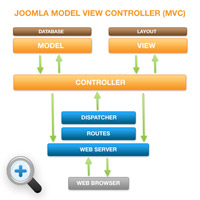
What do you need to create a joomla template
The template contains the various files and folders that make up a Joomla template. These files must be placed in the /templates/directory of a Joomla installation in their own folder.
Files to create a Joomla template:
– css/template.css
– images/logo.jpg
– index.php
– templateDetails.xml
– template_thumbanil.png
index.php : File that contains the HTML/PHP and JavaScript which can be combined with CSS and images from the site. This file has the role to organize the modules.
This file has the following structure:
<?php defined( '_JEXEC' ) or die( 'Restricted access' );?> |
<!DOCTYPE html PUBLIC "-//W3C//DTD XHTML 1.0 Transitional//EN" "http://www.w3.org/TR/xhtml1/DTD/xhtml1-transitional.dtd"> <html xmlns="http://www.w3.org/1999/xhtml" xml:lang="<?php echo $this->language; ?>" lang="<?php echo $this->language; ?>" > <head> <jdoc:include type="head" /> <link rel="stylesheet" href="<?php echo $this->baseurl ?>/templates/mynewtemplate/css/style.css" type="text/css" /> </head> <body> <jdoc:include type="modules" name="top" /> <jdoc:include type="component" /> <jdoc:include type="modules" name="bottom" /> </body> </html> |
That CMS has some special command:
<?php echo $mainframe->getCfg('sitename');?><br /> |
<jdoc:include type="module" name="breadcrumbs" /> <jdoc:include type="modules" name="top" /> <jdoc:include type="modules" name="left" /> <jdoc:include type="component" /> <jdoc:include type="modules" name="right" /> |
The statement is a Joomla template’s method of displaying content specific to the page being viewed. There are various statements, each returning a different part of a Joomla page.
The command
<jdoc:include type="component" /> |
should only appear once in the
<body> |
element of the Template to render the main content of the page with respect to the current page viewed.
This element
<jdoc:include type="head" /> |
should only appear once in the
<head> |
element of the Template to read the content of the style, script and meta elements associated with the current page.
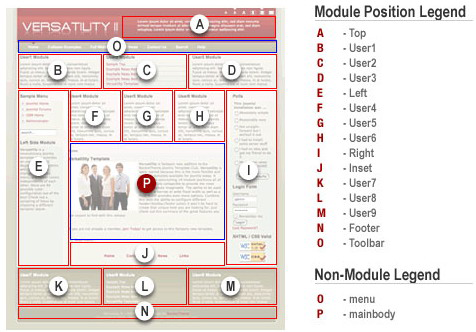
The modules are separated into different areas of a template using template positions set in the templateDetails.xml file.Using the jdoc:inculde’s name=”[template position name'”] attribute, the various modules in their respective positions can be called, rendered, and styled separately.
Below are some examples of modules statements with modules positions used frequently by Joomla theme developers:
<jdoc:include type="modules" name="debug" /> <jdoc:include type="modules" name="icon" /> <jdoc:include type="modules" name="left" style="rounded" /> <jdoc:include type="modules" name="left" style="xhtml" /> <jdoc:include type="modules" name="right" style="xhtml" /> <jdoc:include type="modules" name="status" /> <jdoc:include type="modules" name="syndicate" /> <jdoc:include type="modules" name="title" /> <jdoc:include type="modules" name="toolbar" /> <jdoc:include type="modules" name="top" /> <jdoc:include type="modules" name="top" style="xhtml" /> <jdoc:include type="modules" name="user1" style="xhtml" /> <jdoc:include type="modules" name="user2" style="xhtml" /> <jdoc:include type="modules" name="user3" /> <jdoc:include type="modules" name="user4" /> |
In the next image we see positioning modules:
templateDetails.xml: This file contains template information ( name, date of create, author, copyright, email and website creator, version, description) and all files contained in the template. It is the most important file in the template because without it you cannot install the new template.
File templateDetails.xml has the following structure:
<?xml version="1.0" encoding="utf-8"?> <!DOCTYPE install PUBLIC "-//Joomla! 1.5//DTD template 1.0//EN" "http://dev.joomla.org/xml/1.5/template-install.dtd"> <install version="1.5" type="template"> <name>mynewtemplate</name> <creationDate>2008-05-01</creationDate> <author>John Doe</author> <authorEmail>john@example.com</authorEmail> <authorUrl>http://www.example.com</authorUrl> <copyright>John Doe 2008</copyright> <license>GNU/GPL</license> <version>1.0.2</version> <description>My New Template</description> <files> <filename>index.php</filename> <filename>component.php</filename> <filename>templateDetails.xml</filename> <filename>template_thumbnail.png</filename> <filename>images/background.png</filename> <filename>css/style.css</filename> </files> <positions> <position>breadcrumb</position> <position>left</position> <position>right</position> <position>top</position> <position>user1</position> <position>user2</position> <position>user3</position> <position>user4</position> <position>footer</position> </positions> </install> |
– css : Is a folder containing the templates CSS files (most important is template_css.css). Here is a site to find classes that give us the appearance of font used , the colors of the site, various classes of div, cells and many other classes. It should be noted that when we seek to change something about the style, here is where we must try.
– images : Is the folder that contains images used in template.
Source: http://www.compassdesigns.net
Finally, there’s another very important peculiarity of what does Cialis that brings it so high above its alternatives. It is the only med that is available in two versions – one intended for use on as-needed basis and one intended for daily use. As you might know, Viagra and Levitra only come in the latter of these two forms and should be consumed shortly before expected sexual activity to ensure best effect. Daily Cialis, in its turn, contains low doses of Tadalafil, which allows to build its concentration up in your system gradually over time and maintain it on acceptable levels, which, consequently, makes it possible for you to enjoy sex at any moment without having to time it.