
Some tips to avoid a headacke when dealing with xwiki and xeclipse:
Common ground: xwiki version: 2.0, xwiki syntax: 2.0
-> If you need to create new and a lot of new documents in a space and time is limited for this activity, an error may occur when you close and want to reopen some already created documents in the project. See error display(error1.jpg) After you click “Ok” the connection to the server will be closed.

Sollution:
As a collegues suggested:
1. Reconnect to the server.
If 1. does not do the trick follow these steps:
a. Close XEclipse application.
b. Go to where you have XEclipse on the operating system, in the folder for the current connection, for example: “…/workspace\mBusiness\.xwikieclipse“, and
delete the folders there , and for the 2 files: “objectsStatus.index” and “pagesStatus.index” be sure the lines in them say only this: “<map/>”
c. restart XEclipse, connect, refresh then look for the page
If c. does not work, restart xwiki server too.
Keep in mind, the above operation will not be a secluded error, it may happen for every single page you want to open. This can happen for hours.
I have not understood why is this behaviour.
-> If when wanting to open a document from XEclipse and you get an UTF_8 enconding error, please follow the steps(a-c) from above.
-> If you want to import some javascripts, css styles do this:
a. create a new document in the same project or where you want to.
b. open that page in the Edit: ?editor=object mode
c. use the right(it’s right if in the presentation layout you have chosen to put them in the right part of the web page) panel, it’s the “ADD OBJECT” one.
From there choose: “XWiki.JavaScriptExtension” or “XWiki.StyleSheetExtension” and then press “Add Object from this Class“.
Then in the left part of the page you will see the newly created object. You can edit it. press it, or the “pencil” near it. Give it a name…does not matter that much but for you to know what the script is about, in the contents put the css style classes or the javascript functions.
d. Save and View.
Where you are now: you have a page, that has one or more objects.
What to do with it: If you want to use them, use the css styles, or the javascript codes then you have to “import” this page(that holds the objects) in every document you want to have a use of them.
Code looks like this:
{{velocity}} $xwiki.jsx.use('JQueryLogic') $xwiki.ssx.use("TemplateStyleSheetClass") {{/velocity}} |
(
By this, you can add JQuery into the wiki platform. You may be tempted, like i was, to follow other syntax to import, like this:
$xwiki.jsx.use(“myjavascriptcode.js”,true) // where myjavascriptcode.js is situated in the current used skin.
Using this i had no luck in progressing with anything in jquery.
)
Don’t forget that when using JQuery you need to declare the non-conflict variable. You can place this in the xwiki page :
<script type="text/javascript"><!--mce:0--></script> |
(This sorts a table with the id “myTable”)
-> You need to add divs in the page, and still keep the sections already created. You import the css, write the declaration of divs, and when viewing the page you get to
discover that no sections were kept. reason is simple…(now).
Sollution:
1. you declare the page that has the css object etc:
{{velocity}} $xwiki.ssx.use("TemplateStyleSheetClass") {{/velocity}} |
2. you have 2(or >) css classes : .wrapper, .leftPanel, .rightPanel and you want to put some information in the left panel and something else in the right panel.
Normally you declare : <div>… </div> <div>..</div>
The issue was that the section do Not appear. This should be a section declaration:”== leftsidetext ==” but if trapped in a velocity tag or even html tag declaration
there is no positive reaction 🙂
Here you have to declare like this:
(% class =" wrapper " %) ((( (% class =" leftSidePanel " %) ((( == leftsidetext == {{html}} <span> <a href="/xwiki/bin/edit/projectSpace/MyPage?section=1" style="text-decoration: none;">Edit</a> {{/html}} (% style="color: blue; font-size: 1em;" %) 'leftsidetext' {{html}} </span> {{/html}} ))) (% class =" rightSidePanel "%) ((( 'rightsidetext' ))) ))) |
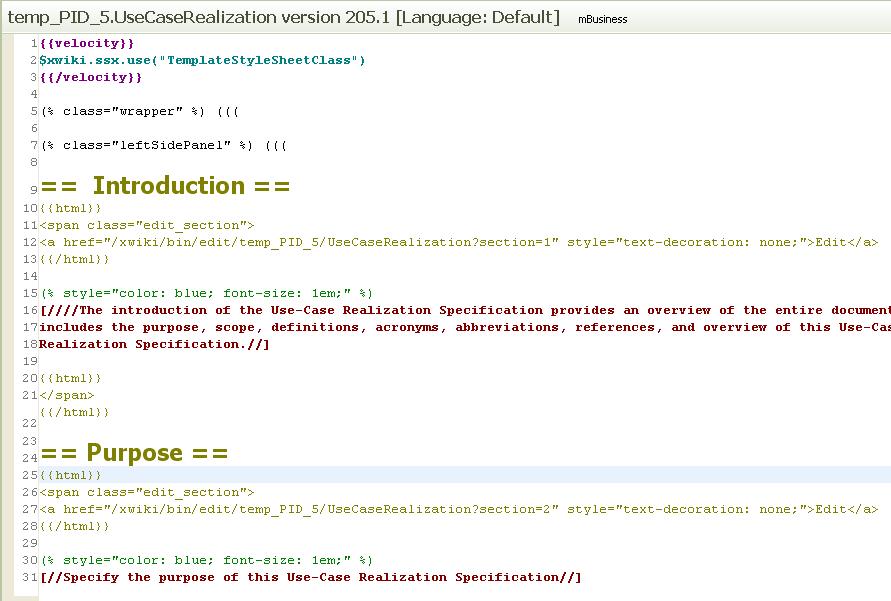
Notes:
– If you want to place velocity code with a bit of html in the panels, wrapp the velocity code with this :
{{velocity}}{{html}} </code> and close them when you are finish: <code>{{/html}} {{/velocity}} |
– If the text does not have a line between the the and the {{/html}} and the {{html}} you will get a html error.
I will try to update this post, maybe it’ll help somebody. 😀
Finally, there’s another very important peculiarity of what does Cialis that brings it so high above its alternatives. It is the only med that is available in two versions – one intended for use on as-needed basis and one intended for daily use. As you might know, Viagra and Levitra only come in the latter of these two forms and should be consumed shortly before expected sexual activity to ensure best effect. Daily Cialis, in its turn, contains low doses of Tadalafil, which allows to build its concentration up in your system gradually over time and maintain it on acceptable levels, which, consequently, makes it possible for you to enjoy sex at any moment without having to time it.
OK, so after reading this I said to myself: if ever needed in the future, avoid using xwiki 🙂
At a first glance (because I never used xwiki) it seems that xwiki provides a lot of features, and probably, at least some of it’s complexity, comes as a consequence.
This web page http://www.wikimatrix.org/compare/XWiki+WikkaWiki+Wiclear+WikiDoc seems an interesting place to compare different wiki implementations. At least from this page (because I am sure there are other wiki implementations as well), xwiki is the only one with Java support. And you get to work with Velocity (http://velocity.apache.org/) and Groovy (http://groovy.codehaus.org/) as programming languages.
Seems complicated at first, at least from my point of view. I will keep this post in mind. If I will ever have to work with xwiki, maybe this will come in handy.
PS: Just a thought: is it possible that some of your problems are caused solely by the XEclipse plugin? (there are two unanswered complaints about XEclipse not working properly on the plugin’s main web page http://xeclipse.xwiki.org/xwiki/bin/view/Main/WebHome 🙂 )
December 10, 2009 at 10:43 am“Just a thought: is it possible that some of your problems are caused solely by the XEclipse plugin?” Answer: sure! 🙂
December 10, 2009 at 11:03 am